
CAD automation · Solar engineering
CAD automation for
solar design teams.
Plugins that take the repetitive work out of solar design: custom automation built around your standards, and ready-made tools like TrueSouth, inside the software your team already runs.
New: TrueSouth, shading and generation reports inside SketchUp, available to buy online.
The problem
The work is necessary.
Doing it by hand is not.
Every solar engineering team has a drafting task that eats days and produces nothing new. Redrawing the same table geometry at a different tilt. Rebuilding a bill of materials by hand because the model and the takeoff live in separate files. Re-tagging members before every GA sheet. Placing the same structure across a site, one block at a time.
Your engineers were hired to make decisions, not to repeat drawings.
What automation looks like
Scroll, and the structure builds itself.
This is Solar Mount Builder working the way it works in SketchUp — geometry and bill of materials from the same set of inputs, nothing drawn twice.
Sample output · illustrative figures
Setting out
Tilt, clearance, row length, module size, section library. The inputs your engineer already knows, entered once.
Heights solve themselves
Front and rear leg lengths come straight from the tilt and ground clearance. No manual trigonometry, no rounding by eye.
Rafters set out on the slope
Placed along the incline at your spacing rule, in the section you specified — not a generic proxy member.
Purlins run across
Positioned to suit the module clamp zones, so what you draw is what your fabricator can actually build.
Modules land on the frame
Portrait or landscape, mixed within a row if the layout calls for it. Live kWp updates as they place.
The schedule writes itself
Every member tagged, counted and weighed, with dimensions and a cut list. The bill of materials comes from the model, not from a second pass by hand.
That whole sequence is one command. Change the tilt and it runs again — the drawing, the tags and the takeoff all move together, because they were never separate documents.
The toolkit
Built from real bottlenecks.
Each tool started as a task that was costing a project time — not as a feature list. They run inside SketchUp and AutoCAD, on the software licenses you already hold.
TrueSouth is ready to buy today; the others are built and fitted to each team's standards. If your bottleneck isn't on this list, that is usually the interesting conversation — most of these began the same way.
Ready-made tool · Available now
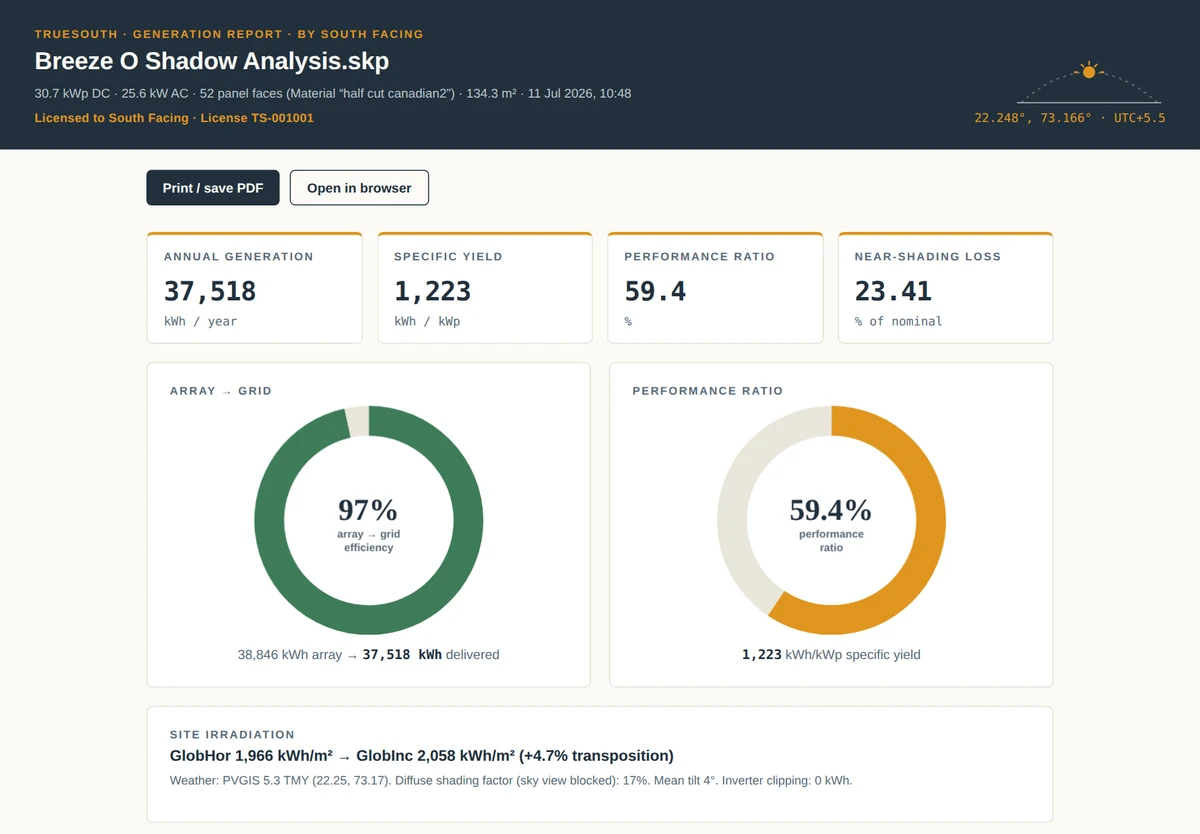
TrueSouth: shading and generation, straight from your SketchUp model.
Pick the panels in your model and get a shading analysis and an hourly generation estimate with a full loss breakdown, as a report you can hand to a client. It is built for early feasibility, so you can compare layouts in minutes without rebuilding them in separate software.
- Ray-traced near shading from everything you model: parapets, water tanks, neighbouring blocks, trees and other rows.
- Hourly yield from PVGIS typical-year weather, with temperature, incidence angle, soiling, wiring and inverter losses.
- When and where shading hits: a month-by-hour heat map, and the worst panels marked on your model.
- Your company's name on every report, ready to print or save as PDF.
- License
- Pay once; keep using v1 with every 1.x update
- Computers
- One at a time, and you can move it
- Runs on
- SketchUp 2019 or newer, on Windows
- Refunds
- Within 7 days, if the key is not yet activated
Feasibility-grade estimates for projects up to about 500 kW, not a replacement for a bankable energy yield assessment.
How it fits
It works inside the setup you already have.
No new CAD seats
Our tools run in the SketchUp or AutoCAD seat your team already has. There is no new platform to subscribe to.
No data migration
Your projects stay where they are, in the formats you already use. Nothing is moved to a platform of ours.
No retraining
Same software, same habits, fewer clicks. Your draftsmen keep working the way they already know how.
How we work
Custom work doesn't start with a plugin.
We study your problem first.
A fixed tool rarely fits a team that has its own standards. There are two approval points, so you are never committed to more than the next step.
Share the problem
The bottleneck in detail, with a few example projects.
Feasibility proposal
What we need from you, how long the study takes, and its price — credited against the build.
You approve the study
Nothing begins until you confirm.
Feasibility study
A written report, a short proof of concept, scope of work and a fixed build price.
You approve the build
Fixed scope, price and timeline, agreed in writing.
Build and deploy
Developed, installed, trained, supported.
You see working proof and a fixed price before committing to development — and the study fee comes off the build.
The feasibility study
What we ask for, and what you get back.
Structures, layouts, stringing, GA sheets, documentation — whichever workflow you want automated, the method is the same.
What we ask from you
- 5–6 representative projects covering your range
- Native editable drawing and model files, not PDFs
- Your sheet template and title block
- Component library and CAD standards
- Revision history, where available
Never the full library — a sample is enough.
What you get back
- What can be fully automated
- What must stay with your engineer
- Proposed module architecture for the build
- A written report you can act on
- A fixed scope, timeline and price
Who's behind it
Akhil Pandya
Founder · South Facing Solutions
The tools exist because the drafting problems did. Every automation here came out of a real project that was taking longer than it should have. TrueSouth began the same way, with feasibility studies that needed a quick, honest shading answer before a layout was fixed.
- Solar PV design engineer by background
- M.Sc. Renewable Energy
- Rooftop, commercial and industrial solar
- SketchUp · AutoCAD · STAAD Pro · PVsyst
Next step
Tell us where the time goes.
Name the drafting task your team would most like to stop doing by hand. That single answer is enough to begin — no brief, no specification, no commitment.
Looking for TrueSouth? Buy it online or read the user guide.